Ecommerce site search: what it's worth in the peak
Ecommerce site search is worth what its misses cost. The formula for searches with zero results, a worked store and four catalog fixes before the peak.

Ecommerce site search is the one place where a shopper types exactly what they want. When the box returns nothing, the store loses the visitor who was closest to buying. The day's revenue report never shows it: it counts the orders that happened, not the ones that were typed and lost.
The number to read before the peak is the share of searches that return zero results, and what those searches would have been worth. On the worked store below, the misses cost 60 orders a year and 10 in the peak month. The fix usually sits in the catalog, in the words customers type, not in a new search tool.
Below: what a zero-result search costs, the worked store's numbers, where Shopify keeps the list of misses, and four catalog fixes to make before Black Friday.
Ecommerce site search is worth what its misses cost: sessions × share that search × share of searches with zero results × the conversion-rate gap. On a store with 300,000 sessions a year, 1 search in 5 finding nothing costs 60 orders and €4,080 a year, and 10 orders and €680 in a 50,000-session peak month.
Key takeaways
- Ecommerce site search loses its value in the searches that return nothing, and the revenue report never shows them.
- Lost orders = sessions × share that search × share with zero results × the conversion-rate gap.
- On the worked store, 1 search in 5 finding nothing costs 60 orders and €4,080 a year, 10 orders in the peak month.
- Most misses are catalog words, not engine failures, and a store selling across the EU needs one rate per language.
- This week: export eight weeks of searches with no results and fix the words in the top 20.
Why ecommerce site search carries intent
A shopper who types into the search box has already said what they want. Baymard Institute, which tests ecommerce usability, found that "roughly half of participants turn to search as their preferred product-finding strategy" (Baymard). The same research says "56% of sites fail to adequately support users' search needs".
When the search finds nothing, the visit often ends. Baymard lists what shoppers do next, and one option reads: "Abandon the site entirely (often turning to external search engines, where they are more likely to succeed)" (Baymard). It also found that "nearly 50% of sites fail to provide users with effective ways to recover from a search that yields no results".
A search with no results is demand the store did not answer. It rarely looks like a problem. Nothing breaks, no error shows, and the shopper leaves quietly.
What a zero-result search costs
The cost is the orders those shoppers would have placed if the search had found something. A shopper who finds nothing still buys now and then: they browse a category, or come back later. So the formula counts only the gap between the two conversion rates: on the worked store below, 2 of every 100 when search finds something against 1 of every 100 when it does not.
Lost orders  = sessions × share that search × share of searches with zero results
               × (conversion when search finds something − conversion when it does not)
Revenue lost = lost orders × average order
Four inputs, and the store already has three of them. Sessions and the average order come from the store's analytics. The share of searches with zero results comes from the search report. The conversion-rate gap is the one input most stores have never written down.
Ecommerce site search on a worked store
The worked store this blog uses has 300,000 sessions a year, a €68 average order and 45 of every 100 euros as margin. It converts 1 session in 100: 3,000 orders a year. The search figures are declared for the example. Replace them with the store's own:
- 10 of every 100 sessions use the search box.
- 1 in 5 of those searches returns nothing.
- Shoppers who find something convert at 2 of every 100.
- Shoppers who find nothing convert at 1 of every 100.
300,000 sessions × 10/100 = 30,000 sessions with a search
 30,000 × 1/5             =  6,000 sessions where search found nothing
  6,000 × (2/100 − 1/100) =     60 orders lost a year

Revenue lost = 60 × €68      = €4,080 a year
Margin lost  = €4,080 × 0.45 = €1,836
The numbers hold against the store's total. Searchers bring 24,000 × 2/100 = 480 orders, plus 6,000 × 1/100 = 60, so 540 of the 3,000. The other 270,000 sessions bring 2,460 orders, about 0.91 of every 100. The store still converts at 1 in 100.
In the peak month, 50,000 sessions run through the same rates:
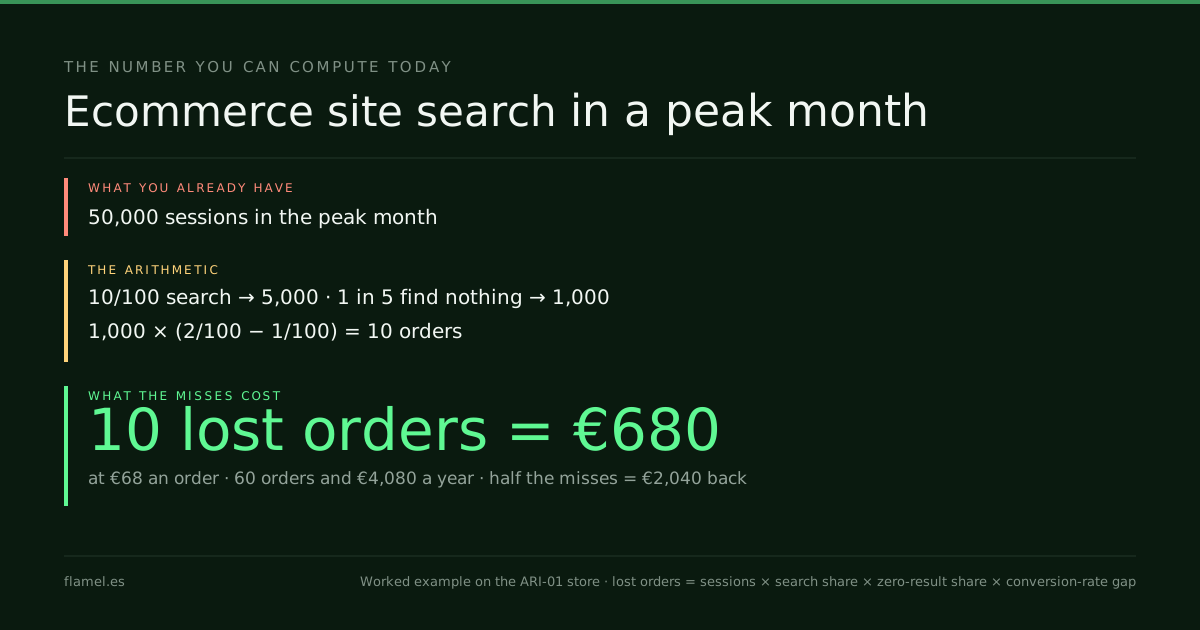
50,000 × 10/100 × 1/5 × 1/100 = 10 orders lost = €680Halve the misses, from 1 search in 5 to 1 in 10, and the store recovers 30 orders a year: €2,040, or 5 orders in the peak month. The search report also gives something the revenue line never will: a list of products customers asked for by name.
Before the peak, the Conversion Audit reads the whole visit of a store, search box included, in five business days, for $500.

Where to find the missing searches
Shopify keeps the list. Its behavior reports include "Top online store searches with no results", which "displays a breakdown of the search terms that your customers used to search for a product in your store" when the search "didn't give them any results" (Shopify Help). Each term comes with "The number of sessions where customers searched your store with that term."
Two details matter in November. Shopify says the report "has a delay up to 72 hours", so a weekend reads late. And the same section has a report called Search conversions over time, which shows how searches turn into orders: a starting point for the conversion-rate gap.
Google Analytics 4 records searches too. Its enhanced measurement sends a "view_search_results" event, and "The search_term parameter populates the Search term dimension" (Google Analytics Help). That gives the terms. The share that found nothing comes from the store platform's own report.
4 fixes for ecommerce site search, in the catalog
Most misses are not a search engine problem. The engine looked, and the catalog did not contain the word. Four fixes come before any new tool:
- Read the top 20 terms with no results every week. Each one is a product the store does not carry, a word the catalog does not use, or a spelling.
- Add the customer's words to the catalog. Product titles, tags and descriptions should carry the names shoppers type. Baymard notes that "some products have alternative titles, such as Nestlé Quik vs. Nesquik".
- Cover the spellings. Baymard writes that "good handling of phonetic misspellings is crucial since the user may only have heard the product's name being spoken".
- Give the empty page a way out. Categories, best sellers and a contact route keep the shopper in the store instead of on a search engine.
A new search tool can rank results better. It cannot find a word the catalog never uses.
One zero-result rate per language
A store that sells across the EU receives searches in several languages. A shopper in Lyon types "robe", one in Munich types "Kleid", one in Amsterdam types "jurk". A catalog written in one language misses the other two.
Read the share of searches with no results by market or language, not as one store-wide average. An average that mixes languages can look healthy while one market finds almost nothing. The fix is the same as in fix 2, done once per language: the words, the sizes and the spellings each market actually types.
Once search finds the product, the product page has to finish the job. Both feed the store's ecommerce conversion rate, which is why a search fix shows up there first. To see where else the revenue leaves, ecommerce conversion rate optimization maps every step of the visit.
The ecommerce site search number for your store
Lost orders  = sessions × share that search × share with zero results × conversion-rate gap
Revenue lost = lost orders × average order
Recovered    = lost orders × share of misses fixed
On the worked store, 1 search in 5 finding nothing costs 60 orders and €4,080 a year, and 10 orders and €680 in the peak month.
What to do by Monday: export the last eight weeks of searches with no results, by term and by language. Mark the top 20 as missing product, missing word or spelling, and fix the words before the traffic arrives.
Work through this with your own numbers
Here is my online store's data: [sessions per year], [share of sessions that use site search], [share of searches that return zero results], [conversion rate of sessions where search found something], [conversion rate of sessions where search found nothing] and [average order value]. Calculate the orders and revenue I lose each year to searches with zero results, using lost orders = sessions × share that search × share with zero results × (conversion when found − conversion when not found). Then check that my numbers are consistent with my overall conversion rate of [overall conversion rate]. Repeat the calculation for my peak month of [peak month sessions]. Finally, here is my list of top search terms with no results: [paste list]. Sort each term into missing product, missing word in the catalog, or spelling, and tell me which three to fix first. Show every step of the arithmetic.FAQ
What is ecommerce site search?
It is the search box inside an online store and the engine behind it. Shoppers type a product name, a category or a need, and the store returns matching products. When it returns nothing, the shopper has to find another way or leave.
How do you find searches with no results in Shopify?
Shopify's behavior reports include Top online store searches with no results. It lists each search term with the number of sessions that used it. The report can run up to 72 hours late.
How much is fixing site search worth?
Multiply sessions by the share that search, the share of searches with zero results and the conversion-rate gap. On a store with 300,000 sessions a year, halving misses from 1 in 5 to 1 in 10 recovers 30 orders and €2,040.
Do I need a new search tool?
Usually not first. Most searches with no results are words the catalog does not use, spellings or products the store does not carry. A new tool ranks results better, but it cannot find a word that is not in the catalog.
See how the Conversion Audit reads your store's search with the rest of the visit: five business days, $500, and the map stays with the store.
Your store, five days.
$500. Zero commitment. Yours either way.

Made between
Barcelona and Bogotá.
What’s holding your store’s sales back, in minutes.
Free, no card. Shopify stores for now.