Shopify conversion rate optimization: 6 steps, in order
Shopify conversion rate optimization in six steps, in order: price each change in euros and ship what can go live before the peak. Worked on an example.

Shopify conversion rate optimization is the order in which a store changes things, ranked by what each change earns on the traffic still to come. The Redi Foods rebuild is read that way. The store moved off WooCommerce to Shopify, and its weekly kit order went from fifteen stacked dropdowns to three steps. The work is measured on 130,465 sessions across 22 months.
In November the order changes. Black Friday falls on 27 November this year, and on the worked store this blog uses, the peak month is declared at twice the usual traffic. What can be switched on and checked before then goes first. A new theme, a new app or a rebuilt checkout waits until January.
Below: the six steps in that order, each with where it lives in Shopify, and the arithmetic that decides what makes the cut.
Before the steps: the Conversion Audit reads a Shopify store in five business days, for $500, and hands back its fixes in this order.
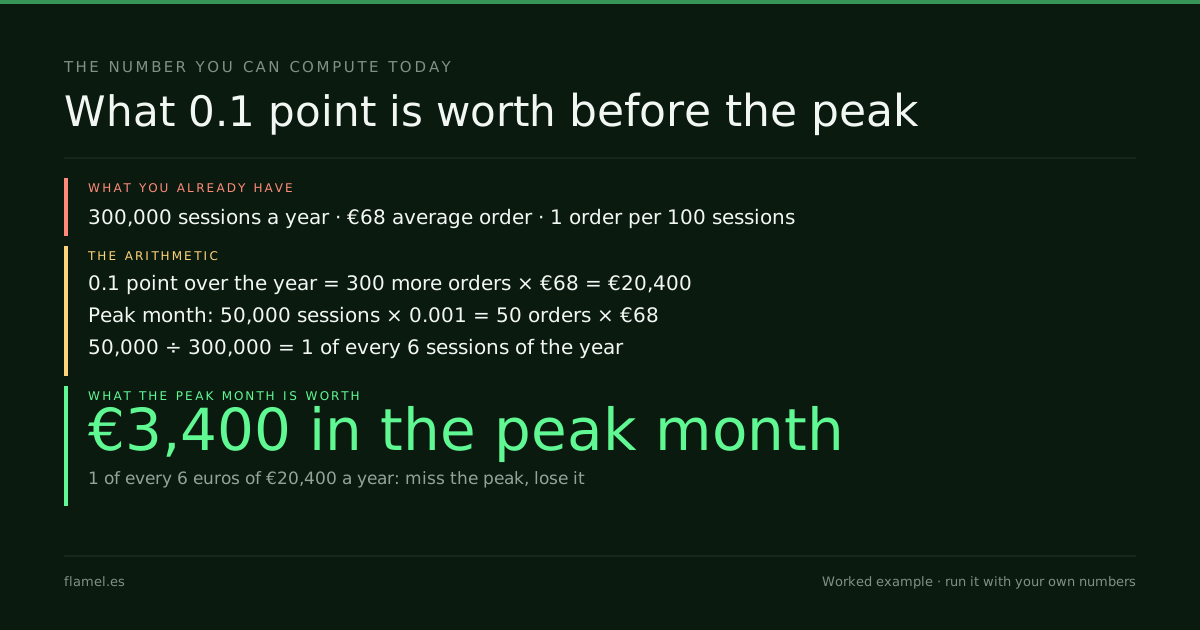
Shopify conversion rate optimization ranks every change by conversion points × sessions it will see × average order. On a store with 300,000 sessions a year and a €68 order, 0.1 point is worth €20,400 a year, and €3,400 of it arrives in a 50,000-session peak month. Ship settings first; rebuild in January.
Key takeaways
- Shopify conversion rate optimization is an order of work, ranked by value and time to go live, not a list of apps.
- Read Shopify's four-step funnel first: all sessions, cart additions, reached checkout, completed checkout.
- On the worked store, 0.1 point is €20,400 a year, and 1 of every 6 of those euros arrives in the peak month.
- Before the peak: express checkout, a real-card test of the bank step and small template edits. After it: rebuilds, themes and apps.
- This week, price the top three changes with the store's own sessions and order value, and ship only what goes live before 27 November.
What Shopify conversion rate optimization puts first
Most lists of Shopify fixes are lists of apps. The list is the easy part. The hard part is the order, because a store cannot ship everything at once and the season does not wait.
The order comes from two numbers per change. The first is what it is worth on the sessions it will still see. The second is how long it takes to go live and be checked.
Ecommerce conversion rate optimization covers where revenue leaves any store. This is the Shopify version, with the peak in front of it. If the question is whether the current rate is good at all, ecommerce conversion rate answers that first.
Step 1: Read the funnel Shopify already reports
Shopify's behavior reports already split the visit into four steps: all sessions, sessions with cart additions, sessions that reached checkout and sessions that completed checkout. Shopify Help calculates each step as "the number of sessions for a step divided by the number of total sessions."
Find the biggest drop before buying anything. Most sessions lost before the cart point to the product page. Most lost between checkout and purchase point to payment.
One caution. Shopify rolled out a new session measurement from 21 to 23 September 2026, and session-based numbers may differ across that date. Compare periods on the same side of it.
Step 2: Price each change in euros
Every change gets the same line:
Value of a change = conversion points moved × sessions it will see × average orderThe worked store this blog uses, as an example: 300,000 sessions a year, a €68 average order and 1 order for every 100 sessions. That is 3,000 orders and €204,000 a year. Its peak month is declared at 50,000 sessions, twice its 25,000 average, the same month the page speed post uses.
0.1 point in an ordinary month = 25,000 × 0.001  = 25 orders × €68  = €1,700
0.1 point in the peak month    = 50,000 × 0.001  = 50 orders × €68  = €3,400
0.1 point over the year        = 300,000 × 0.001 = 300 orders × €68 = €20,400
The peak month holds 1 of every 6 sessions of the year (50,000 ÷ 300,000). A change that goes live after it misses €3,400, one of every six euros of its yearly value. That is the case for small and early: a change live on 20 November beats a rebuild live on 10 December.

Step 3: Turn on express checkout before anything
Express checkout is the cheapest change on the list, because the buttons already exist. Shopify's help on accelerated checkouts lists 5 of them: Shop Pay, Apple Pay, Google Pay, Amazon Pay and PayPal. At checkout they "display in an Express Checkout section at the beginning of your customer's checkout experience." Some can also sit on the product page, so customers "skip the cart and go directly to the checkout."
Activate the methods the store's customers already use, and check each one on a phone. Checkout optimization prices one abandonment point on the same worked store.
Step 4: Test the bank step with a card
In Europe, a card payment can stop at a screen from the customer's bank. The EU's second Payment Services Directive requires strong customer authentication when a payer "initiates an electronic payment transaction" (PSD2, Article 97).
Shopify Payments handles it. Stores in a "PSD2 region" automatically use a 3D Secure checkout flow, and Shopify "only uses 3DS when required by the card-issuing bank" (Shopify Help).
So part of the drop between "reached checkout" and "completed checkout" can happen off the store's pages. Before the peak, place a real order with a real card, on a phone, from the countries that buy most. Watch what the bank asks for. If orders stop there, the fix is in payments, not in the theme.
Step 5: Fix the template, not each product
On Shopify, product pages are built from templates. "When you edit a template, your changes apply to every page that uses the template," says Shopify Help, and templates are edited in the theme editor. One edit to the product template reaches every product that uses it: delivery dates, sizes, returns, what the price includes.
Small template edits go before the peak. Rebuilds go after it. Redi Foods is the rebuild version of the same idea: the highest-intent screen asked for 15 stacked dropdowns and became 3 steps, with sizes shown as real food at real prices and a running total that never leaves the screen. That kind of work belongs in January. Product page optimization prices one unanswered question per thousand sessions.
Step 6: Freeze themes and apps until January
Shopify lists "the apps you've installed" among the biggest factors in store speed, and warns that "too many apps loading assets on your storefront can slow performance" (Shopify Help). Removing one is not instant either: uninstalling an app "doesn't automatically remove its code from your theme."
So November is the wrong month to add apps or swap themes. Review the installed apps, remove the ones that do not earn their weight, and leave the new theme for January. Page speed and conversion rate prices one second of load time in the same peak month.
| Step | Where it lives in Shopify | Before the peak? |
|---|---|---|
| 1. Read the funnel | Analytics, behavior reports | Yes, this week |
| 2. Price each change | A spreadsheet | Yes |
| 3. Express checkout | Payments | Yes |
| 4. The bank step | A real order with a real card | Yes |
| 5. Product template | Theme editor | Small edits yes, rebuilds in January |
| 6. Themes and apps | Apps and theme library | Remove only, add in January |
The Shopify conversion rate optimization number for your store
Value of a change = conversion points × sessions it will see × average order
Peak share        = peak-month sessions ÷ sessions a year
On the worked store, 0.1 point is €20,400 a year, and €3,400 of it arrives in the peak month: 1 of every 6 euros.
What to do by Monday: take the top three changes on the list. Price each one with the store's own sessions and average order. Ship only the ones that can be live and checked before 27 November, and put the rest on a January list, priced the same way.
A rebuild is read over months, not weeks. Redi Foods is measured on 130,465 sessions across 22 months.
Work through this with your own numbers
I run a Shopify store with [sessions a year] sessions a year, an average order of [average order] and [orders per 100 sessions] orders for every 100 sessions. My peak month brings [peak-month sessions] sessions. Here are the changes I am considering, each with the conversion points I expect it to move and the days it needs to go live and be checked: [list of changes]. For each change, calculate its value as conversion points × sessions it will see × average order, for the peak month and for a full year. Then calculate the peak share as peak-month sessions ÷ sessions a year. Sort the changes into two lists: the ones that can be live and checked before [peak start date], and the ones that should wait until January. Show every step of the arithmetic, and flag any change whose expected lift looks too large to be realistic.FAQ
How do I increase my Shopify conversion rate?
Read Shopify's four-step funnel first to find the biggest drop, then price each change as conversion points × sessions it will see × average order. Before a peak, ship what can go live and be checked quickly, such as express checkout and product template edits. Rebuilds and new apps wait.
What is a good conversion rate on Shopify?
The useful comparison is the store against itself, step by step: sessions with cart additions, sessions that reached checkout and sessions that completed it. On the worked store, 1 order for every 100 sessions, each 0.1 point is worth €20,400 a year.
Does express checkout help Shopify conversion?
It is the cheapest change to test, because Shopify already offers the buttons: Shop Pay, Apple Pay, Google Pay, Amazon Pay and PayPal. They appear at the start of checkout, and some on the product page. Activate the methods customers already use and check each on a phone.
Do Shopify apps slow down a store?
Shopify lists installed apps among the biggest factors in store speed, and warns that too many apps loading assets can slow performance. Uninstalling an app does not always remove its code from the theme, so review apps outside the peak.
The Conversion Audit puts a Shopify store's fixes in order: five business days, $500, and the map stays with you whether or not you hire anyone next.
Your store, five days.
$500. Zero commitment. Yours either way.

Made between
Barcelona and Bogotá.
What’s holding your store’s sales back, in minutes.
Free, no card. Shopify stores for now.